|
最近玩了一些MP3模块,对Arduino播放音乐非常感兴趣。正好看见Arduino官方有专门为播放音乐做的函数tone,就研究了一下。
首先讲下简单的乐理知识,知道音乐是怎么演奏出来的自然就可以通过代码来进行编排了。
1.音符的意义。
一首乐曲有若干音符组成,每个音符由音调和演奏时间组成。
不同的音调在物理上就对应不同频率的音波。所以我们只要控制输出的频率和时长就能输出一首音乐了。当然实际的音乐很复杂,又有连接,还有重音什么的。这个就先不在讨论范围内了。 若我们控制 Arduino 输出对应频率的PWM到喇叭,喇叭就会发出相应频率下的声音。 Arduino官方网站给出了不同音符对应的不同频率的头文件,非常方便我们编程。
2.音符的演奏时间
每个音符都会播放一定的时间,这样就能构成一首歌曲。 在音乐上,音符节奏分为1拍、1/2拍、1/4拍、1/8拍,假设一拍音符的时间为1;半拍为0.5;1/4拍为0.25;1/8拍为0.125……,所以我们可以为每个音符赋予这样的拍子播放出来,音乐就成了。 注意,这个时间1在不同速度的乐曲里是不一样的,没有一定规则。
3.如何使用tone函数。
ArduinoTone函数的官方介绍地址:
http://arduino.cc/en/Tutorial/Tone 使用函数为Tone(): http://arduino.cc/en/Reference/Tone
4、硬件制作方法。 需要的东西很简单。 所需硬件:Arduino板子一块,小型扬声器一个,导线两根。如果扬声器声音太大,也可适当配置220欧姆电阻一个与扬声器串联。
我先贴一张官方给出的图。
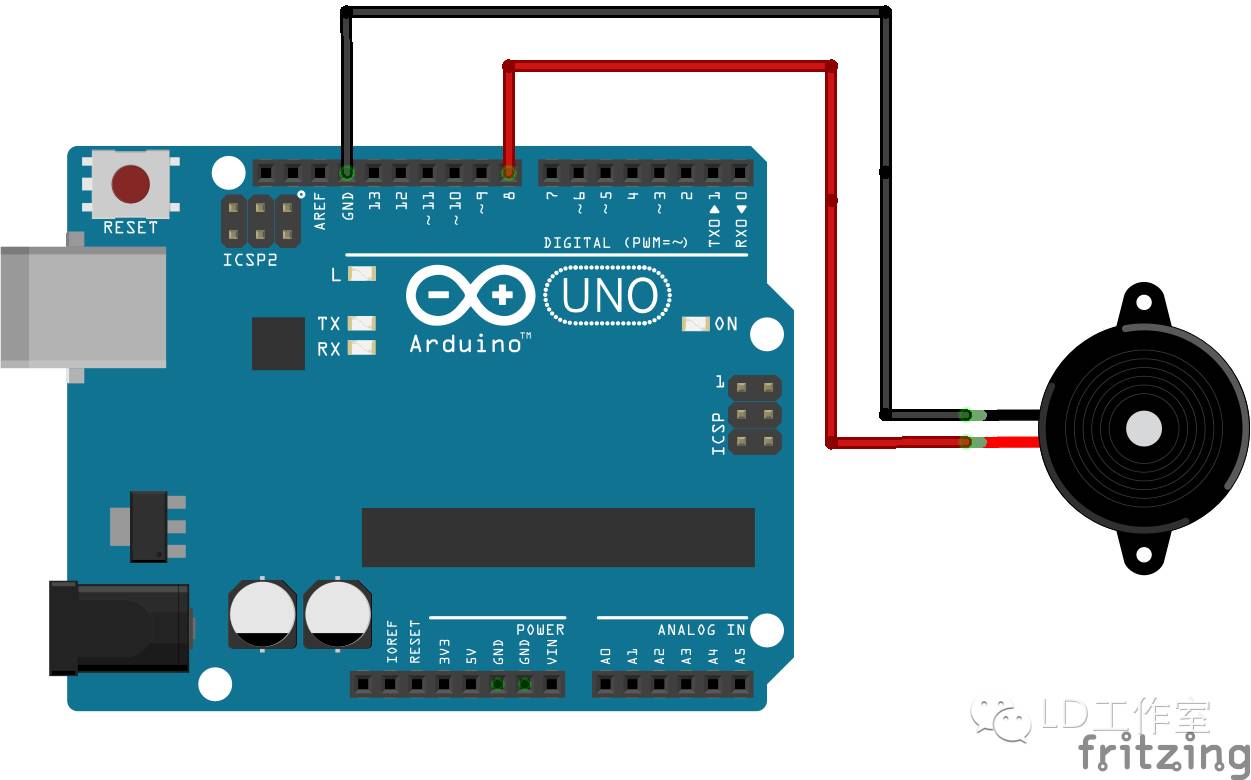
下面是原理图:
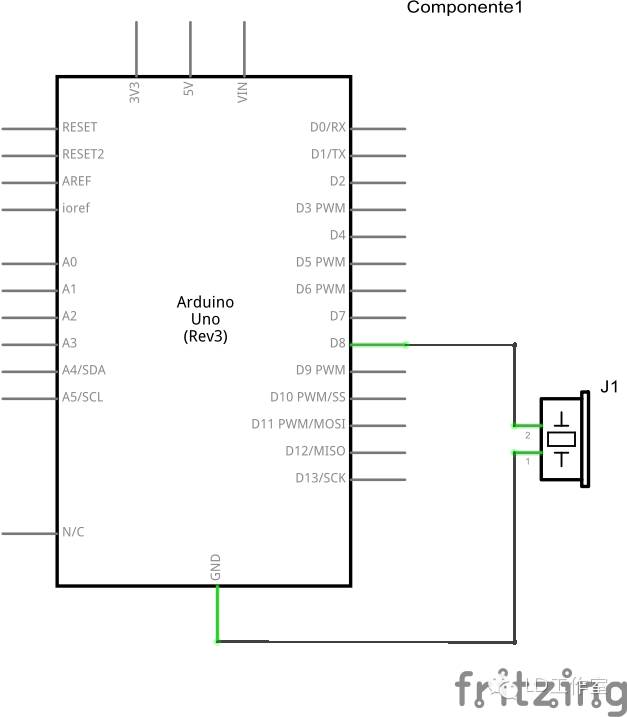
接好线之后,将以下代码粘贴到Arduino IDE中。代码如下:
官方给出的代码。 /* Melody Plays a melody circuit: * 8-ohm speaker on digital pin 8 created 21 Jan 2010 modified 30 Aug 2011 by Tom Igoe This example code is in the public domain. http://arduino.cc/en/Tutorial/Tone */ #include "pitches.h" // notes in the melody: int melody[] = { NOTE_C4, NOTE_G3,NOTE_G3, NOTE_A3, NOTE_G3,0, NOTE_B3, NOTE_C4}; // note durations: 4 = quarter note, 8 = eighth note, etc.: int noteDurations[] = { 4, 8, 8, 4,4,4,4,4 }; void setup() { // iterate over the notes of the melody: for (int thisNote = 0; thisNote < 8; thisNote++) { // to calculate the note duration, take one second // divided by the note type. //e.g. quarter note = 1000 / 4, eighth note = 1000/8, etc. int noteDuration = 1000/noteDurations[thisNote]; tone(8, melody[thisNote],noteDuration); // to distinguish the notes, set a minimum time between them. // the note's duration + 30% seems to work well: int pauseBetweenNotes = noteDuration * 1.30; delay(pauseBetweenNotes); // stop the tone playing: noTone(8); } } void loop() { // no need to repeat the melody. }
该程序中使用了这两个函数:
函数的参数说明:
pin: 你要接扬声器的接口,任意口均可,int 型
frequency:音乐频率,int 型
duration: 音符持续的时间,是毫秒值,unsigned long
代码中调用了头文件“pitches.h”。这个头文件正式上面提到的不同音符对应的不同频率的头文件。官方同样给出了该头文件。该pitches.h文件内容如下:
可以看到,里面是定义的大量的宏,即用宏名代替了频率名,这些宏每个都代表了钢琴的一个琴键,找到钢琴琴键所对应的音高,就能把谱子编程我们的程序了。
对于不懂音乐的我来说当然是看简谱比较方便,于是就把这些宏对应成了简谱,并注释了下。。。。。好麻烦的说。
#define NOTE_B0 31 //....7 #define NOTE_C1 33 //...1 #define NOTE_CS1 35 #define NOTE_D1 37 //...2 #define NOTE_DS1 39 #define NOTE_E1 41 //...3 #define NOTE_F1 44 //...4 #define NOTE_FS1 46 #define NOTE_G1 49 //...5 #define NOTE_GS1 52 #define NOTE_A1 55 //...6 #define NOTE_AS1 58 #define NOTE_B1 62 //...7 #define NOTE_C2 65 //..1 #define NOTE_CS2 69 #define NOTE_D2 73 //..2 #define NOTE_DS2 78 #define NOTE_E2 82 //..3 #define NOTE_F2 87 //..4 #define NOTE_FS2 93 #define NOTE_G2 98 //..5 #define NOTE_GS2 104 #define NOTE_A2 110 //..6 #define NOTE_AS2 117 #define NOTE_B2 123 //..7 #define NOTE_C3 131 //.1 #define NOTE_CS3 139 #define NOTE_D3 147 //.2 #define NOTE_DS3 156 #define NOTE_E3 165 //.3 #define NOTE_F3 175 //.4 #define NOTE_FS3 185 #define NOTE_G3 196 //.5 #define NOTE_GS3 208 #define NOTE_A3 220 //.6 #define NOTE_AS3 233 #define NOTE_B3 247 //.7 #define NOTE_C4 262 //1 #define NOTE_CS4 277 #define NOTE_D4 294 //2 #define NOTE_DS4 311 #define NOTE_E4 330 //3 #define NOTE_F4 349 //4 #define NOTE_FS4 370 #define NOTE_G4 392 //5 #define NOTE_GS4 415 #define NOTE_A4 440 //6 #define NOTE_AS4 466 #define NOTE_B4 494 //7 #define NOTE_C5 523 //1. #define NOTE_CS5 554 #define NOTE_D5 587 //2. #define NOTE_DS5 622 #define NOTE_E5 659 //3. #define NOTE_F5 698 //4. #define NOTE_FS5 740 #define NOTE_G5 784 //5. #define NOTE_GS5 831 #define NOTE_A5 880 //6. #define NOTE_AS5 932 #define NOTE_B5 988 //7. #define NOTE_C6 1047 //1.. #define NOTE_CS6 1109 #define NOTE_D6 1175 //2.. #define NOTE_DS6 1245 #define NOTE_E6 1319 //3.. #define NOTE_F6 1397 //4.. #define NOTE_FS6 1480 #define NOTE_G6 1568 //5.. #define NOTE_GS6 1661 #define NOTE_A6 1760 //6.. #define NOTE_AS6 1865 #define NOTE_B6 1976 //7.. #define NOTE_C7 2093 //1... #define NOTE_CS7 2217 #define NOTE_D7 2349 //2... #define NOTE_DS7 2489 #define NOTE_E7 2637 //3... #define NOTE_F7 2794 //4... #define NOTE_FS7 2960 #define NOTE_G7 3136 //5... #define NOTE_GS7 3322 #define NOTE_A7 3520 //6... #define NOTE_AS7 3729 #define NOTE_B7 3951 //7... #define NOTE_C8 4186 //1.... #define NOTE_CS8 4435 #define NOTE_D8 4699 //2.... #define NOTE_DS8 4978
还好有双屏电脑。。要不然感觉窗口不够用。。看着短短一首歌这么几个数字,然而写出来却十分的坑爹。。
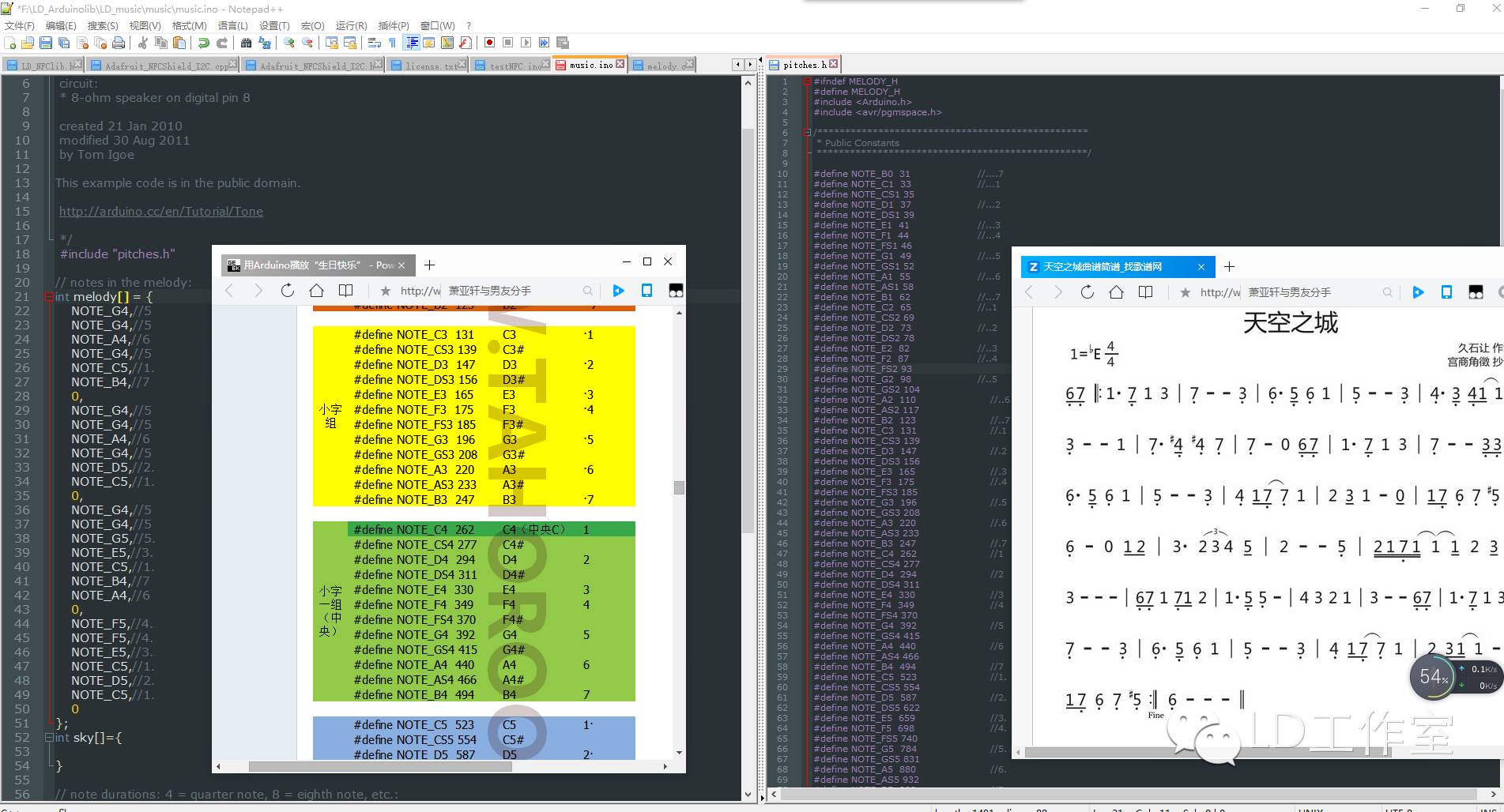
我比较喜欢纯音乐,就做一首天空之城
首先找到天空之城的简谱:
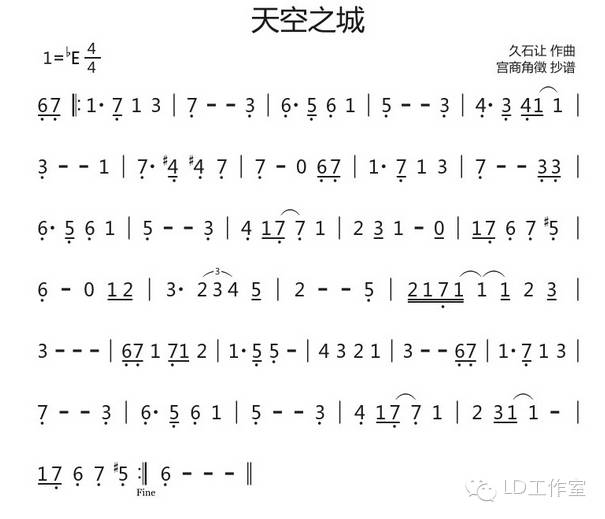
再对照上表,制作其旋律函数为:
ARDUINO 代码复制打印 int sky[]={ NOTE_A3,//.6 NOTE_B3,//.7 NOTE_C4,//1 NOTE_C4,//1 NOTE_B3,//.7 NOTE_C4,//1 NOTE_E4,//3 NOTE_B3,//.7 NOTE_B3,//.7 NOTE_B3,//.7 NOTE_E3,//.3
NOTE_A3,//.6 NOTE_A3,//.6 NOTE_G3,//.5 NOTE_A3,//.6 NOTE_C4,//1
NOTE_G3,//.5 NOTE_G3,//.5 NOTE_G3,//.5 NOTE_E3,//.3
NOTE_F3,//.4 NOTE_F3,//.4 NOTE_E3,//.3 NOTE_F3,//.4 NOTE_C4,//1 NOTE_C4,//1
NOTE_E3,//.3 NOTE_E3,//.3 NOTE_E3,//.3 NOTE_C4,//1
NOTE_B3,//.7 NOTE_B3,//.7 NOTE_FS3,//.4# NOTE_FS3,//.4# NOTE_B3,//.7
NOTE_B3,//.7 NOTE_B3,//.7 0, NOTE_A3,//.6 NOTE_B3,//.7
NOTE_C4,//1 NOTE_C4,//1 NOTE_B3,//.7 NOTE_C4,//1 NOTE_E4,//3
NOTE_B3,//.7 NOTE_B3,//.7 NOTE_B3,//.7 NOTE_E3,//.3 NOTE_E3,//.3
NOTE_A3,//.6 NOTE_C4,//1 NOTE_G3,//.5 NOTE_A3,//.6 NOTE_C4,//1
NOTE_G3,//.5 NOTE_G3,//.5 NOTE_G3,//.5 NOTE_E3,//.3
NOTE_F3,//.4 NOTE_C4,//1 NOTE_B3,//.7 NOTE_B3,//.7 NOTE_C4,//1
NOTE_D4,//2 NOTE_E4,//3 NOTE_C4,//1 NOTE_C4,//1 0,
NOTE_C4,//1 NOTE_B3,//.7 NOTE_A3,//.6 NOTE_B3,//.7 NOTE_GS3,//.5#
NOTE_A3,//.6 NOTE_A3,//.6 0, NOTE_C4,//1 NOTE_D4,//2 };
持续时间函数为:
int skydura[79] = { 8,8, 4,8,8,4,4, 4,4,4,4, 4,8,8,4,4, 4,4,4,4, 4,8,8,8,8,4, 4,4,4,4, 4,8,8,4,4, 4,4,4,8,8, 4,8,8,4,4, 4,4,4,8,8, 4,8,8,4,4, 4,4,4,4, 4,8,8,4,4, 4,8,4,4,8, 8,8,4,4,4, 4,4,4,8,8, };
可以直接把上面的两个函数覆盖官方的例子,写入Arduino就行了
pitches.h 文件不用修改,直接使用。 比较偷懒,只做了一半。。。但就是如此也做了2个多小时。。太烦了。。 到这里就结束了。希望大家继续关注我们的微信。
如果喜欢观看类似科技新奇事物,以及了解创客圈最新资讯,或者您对Arduino有所耳闻,可以关注我们微信公众号,一定会带给您最新的资讯,最实用的教程,以及创客最新的玩意。
微信公众号:liudaosixway 也可以加入我们Arduino技术支持qq群:329657595
|



 发表于 2016-1-27 10:09:20
